
Chief helper
Dad: tool-finder and question-asker
Dad finds the right tools, helps with the tricky bits and asks lots of “what if…?” questions. He’s learning right alongside everyone else.
About us
Future Kid started at home. We sketch, build, code and craft things together, and we love it so much we wanted to share it. This site is our way of inviting you to make cool stuff with us.
Start making
Dad: tool-finder and question-asker
Dad finds the right tools, helps with the tricky bits and asks lots of “what if…?” questions. He’s learning right alongside everyone else.
Mum: stock-filler and chief tidy-upper
Mum checks everything before it goes on the site and keeps us stocked with card, glue and batteries. She’s also the one who makes sure we clean up after ourselves. Every workshop needs a Mum!
The sister: drawing, design and arts and crafts
Every good idea starts as a sketch, and she’s the one holding the pencil. She designs how things should look, then brings them to life with paper, paint, glue and lots of colour.
The brother: building, coding and 3D design
If it has a motor, a screen or a button, he wants to make it do something new. He builds it, codes it, tests it, and when it breaks, he works out why.
Almost every project goes round the same loop. If it works for a paper plane, it works for a robot.
Here are some of the projects we’ve made. Every one of them taught us something new.
Wheels, motors and a controller, all working together. It’s a brilliant way to find out how electricity turns into movement.
Watch the build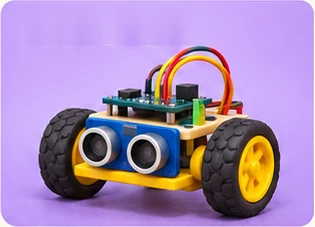
Robots that sense what’s around them and decide what to do next. Try thinking like one in our robotics challenge.
Watch the robot armA crane that lifts and lowers with a motor. Getting it to lift without tipping over is a real engineering puzzle.
Pages built from scratch. It’s amazing what you can make with words, colours and a bit of code.
Games with a goal, a challenge and a way to win. Making a game means planning every move, then fixing everything that goes wrong.
Try the coding challengePress a button, get a sweet! A tasty way to learn how buttons, motors and moving parts work together.
Designing objects on screen, then printing them for real. A model you can hold in your hand started as an idea in your head.
See our 3D-printed ice-cream cat
Paper, card, paint and glue. This is where the whole family gets stuck in, and where lots of big ideas start.
Try the design challengeDescribing an idea to an AI coding assistant, then testing, fixing and improving what it makes. You still have to think like a coder: the AI is a helper, not the boss.
You don’t need a workshop to start. These are the tools we use most, and you can start with all of them for free.
Drag and drop simple shapes to design 3D objects in your web browser. A great first step into 3D modelling.
Visit Tinkercad (opens another website in a new tab)Snap code blocks together to make games and animations. Perfect for your first program.
Visit Scratch (opens another website in a new tab)Write and run real code in your web browser, with no setup. Great for websites and bigger projects.
Visit Replit (opens another website in a new tab)Gets 3D designs ready to print. It slices a model into thin layers the printer builds one by one.
Visit Bambu Studio (opens another website in a new tab)For grown-ups: some of these tools need an account, and each has its own age rules. Please check them and set things up together.
You don’t have to be a genius to make cool stuff. You just have to start, get it a bit wrong, and try again. That’s what we do every time.
Pick a challenge, make something, and share it in the gallery for feedback from the community. Unfinished is fine. The best projects are never really finished.
We built Future Kid to help children aged 7 to 12 get hands-on with science, technology, engineering and maths, at home or at school.
The challenges need no accounts and no personal details. Many need only paper, card and things you already have. An adult checks every project before it appears in the gallery.